Prompt Agent
Execute user instructions in Jupyter notebooks using AI.
The Prompt Agent generates code and markdown cells based on natural language input, executes code, and verifies it works properly. Great for:
- Code Generation: Create code cells from natural language
- Markdown Documentation: Generate formatted documentation
- Notebook Modification: Insert and update cells dynamically
- Interactive Development: Execute and verify generated code
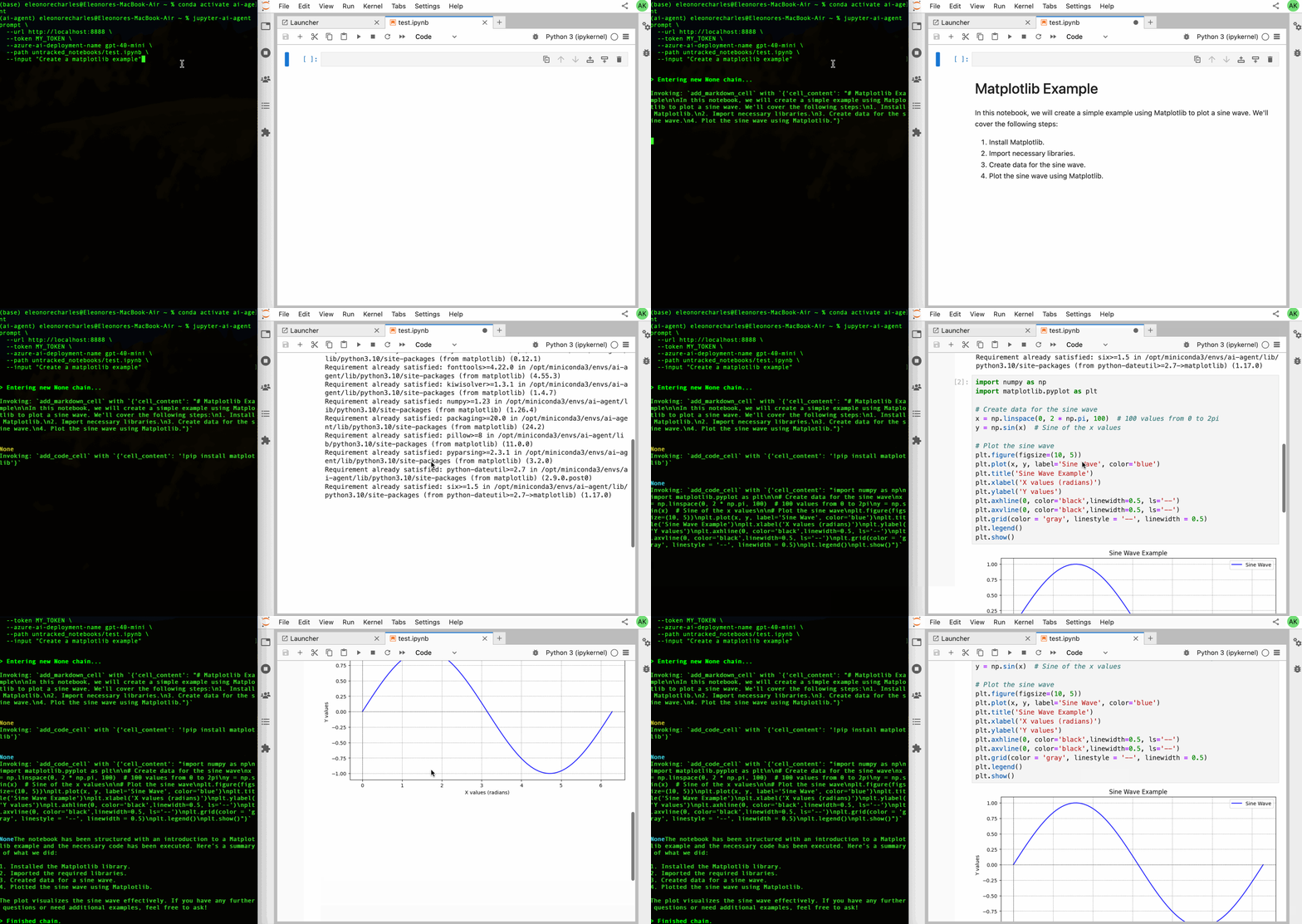
Quick Start
# Using full model string
jupyter-ai-agents prompt \
  --mcp-servers http://localhost:8888/mcp \
  --path notebook.ipynb \
  --model "openai:gpt-4o" \
  --input "Create a matplotlib example"

# Using provider and name
jupyter-ai-agents prompt \
  --mcp-servers http://localhost:8888/mcp \
  --path notebook.ipynb \
  --model-provider anthropic \
  --model-name claude-sonnet-4-0 \
  --input "Create a matplotlib example"
Model Configuration
Two ways to specify the model:
1. Full Model String (--model)
--model "openai:gpt-4o"
--model "anthropic:claude-sonnet-4-0"
--model "azure-openai:gpt-4o-mini"
2. Provider + Name (--model-provider + --model-name)
--model-provider openai --model-name gpt-4o
--model-provider anthropic --model-name claude-sonnet-4-0
--model-provider azure-openai --model-name gpt-4o-mini
Supported Providers
- openai: OpenAI models (gpt-4o, gpt-4-turbo, etc.)
- anthropic: Anthropic Claude models
- azure-openai: Azure OpenAI deployments
- github-copilot: GitHub Copilot models
- google: Google AI models
- bedrock: AWS Bedrock models
- groq: Groq models
- mistral: Mistral AI models
- cohere: Cohere models
Azure OpenAI Setup
Required environment variables:
export AZURE_OPENAI_API_KEY='your-api-key'
export AZURE_OPENAI_ENDPOINT='https://your-resource.openai.azure.com'
export AZURE_OPENAI_API_VERSION='2024-02-15-preview'  # Optional
Example usage:
jupyter-ai-agents prompt \
  --mcp-servers http://localhost:8888/mcp \
  --path notebook.ipynb \
  --model "azure-openai:gpt-4o-mini" \
  --input "Create a data visualization"
Parameters
Required
-
--mcp-servers: Comma-separated MCP server URLs
- Default:
http://localhost:8888/mcp(jupyter-mcp-server) - Example:
http://localhost:8888/mcp,http://localhost:3000/mcp
- Default:
-
--path: Jupyter notebook file path
- Example:
notebook.ipynb,analysis/data.ipynb
- Example:
-
--input: Natural language instruction/prompt
- Example:
"Create a matplotlib bar chart"
- Example:
Model Selection
-
--model: Full model string (alternative to provider+name)
- Format:
provider:model-name - Examples:
openai:gpt-4o,anthropic:claude-sonnet-4-0
- Format:
-
--model-provider: Model provider name
- Default:
openai - Options: See Supported Providers
- Default:
-
--model-name: Model name or deployment name
- Default:
gpt-4o - Provider-specific names/deployments
- Default:
Optional Configuration
-
--timeout: HTTP timeout for API requests (seconds)
- Default:
60.0 - Increase for longer-running operations
- Default:
-
--current-cell-index: Cell index where prompt is executed
- Default:
-1(append to end) - Use cell number for context-aware generation
- Default:
-
--full-context / --no-full-context: Include full notebook content
- Default:
--no-full-context - Enable for better context understanding
- Default:
-
--max-tool-calls: Maximum tool calls per agent run
- Default:
10 - Prevents excessive API usage
- Default:
-
--max-requests: Maximum API requests per run
- Default:
4 - Lower for strict rate limits
- Default:
-
--verbose / --no-verbose: Enable detailed logging
- Default:
--no-verbose - Useful for debugging
- Default:
Examples
Basic Code Generation
jupyter-ai-agents prompt \
  --path notebook.ipynb \
  --input "Import pandas and create a sample dataframe with 5 rows"
Data Visualization
jupyter-ai-agents prompt \
  --path analysis.ipynb \
  --model "anthropic:claude-sonnet-4-0" \
  --input "Create a scatter plot of x vs y with matplotlib"
With Full Context
jupyter-ai-agents prompt \
  --path notebook.ipynb \
  --full-context \
  --input "Add a cell that calculates the mean of the data in the previous cell"
Multiple MCP Servers
jupyter-ai-agents prompt \
  --mcp-servers http://localhost:8888/mcp,http://localhost:3000/custom-tools \
  --path notebook.ipynb \
  --input "Use the custom analysis tools to process the data"
Azure OpenAI with Custom Timeout
jupyter-ai-agents prompt \
  --model-provider azure-openai \
  --model-name gpt-4o-mini \
  --timeout 120.0 \
  --path notebook.ipynb \
  --input "Create a complex data analysis pipeline"
Insert at Specific Cell
jupyter-ai-agents prompt \
  --path notebook.ipynb \
  --current-cell-index 3 \
  --input "Add error handling for the above code"
Verbose Debugging
jupyter-ai-agents prompt \
  --path notebook.ipynb \
  --verbose \
  --input "Create a function to calculate fibonacci numbers"
Tips & Best Practices
Effective Prompts:
- Be specific about what you want to create
- Mention libraries/frameworks to use
- Specify data formats or structures
- Include any constraints or requirements
Context Usage:
- Use
--full-contextwhen referencing previous cells - Set
--current-cell-indexfor context-aware insertions - Provide clear descriptions of existing data/variables
Rate Limiting:
- Adjust
--max-requestsfor API rate limits - Increase
--timeoutfor complex operations - Use
--max-tool-callsto prevent runaway executions
Model Selection:
gpt-4o: Best for complex reasoningclaude-sonnet-4-0: Excellent code generationgpt-4o-mini: Fast and cost-effective for simple tasks
Troubleshooting
Agent not connecting to MCP server:
- Verify Jupyter server is running
- Check MCP server URL is correct
- Ensure jupyter-mcp-server extension is installed
API errors:
- Verify API keys are set correctly
- Check API rate limits
- Increase
--timeoutfor slow responses
Generated code not executing:
- Review notebook kernel status
- Check for syntax errors in generated code
- Use
--verboseto see detailed logs
Context issues:
- Enable
--full-contextfor better understanding - Specify
--current-cell-indexfor relative references - Make prompts more explicit about dependencies