Explain Error Agent
Analyze and fix errors in Jupyter notebooks using AI.
The Explain Error Agent identifies errors in notebook cells, explains what went wrong, and inserts corrected code cells to fix the issue. Great for:
- Error Analysis: Understand the root cause of exceptions
- Automatic Fixes: Generate corrected code cells
- Learning: Get clear explanations of what went wrong
- Debugging: Quickly resolve common coding errors
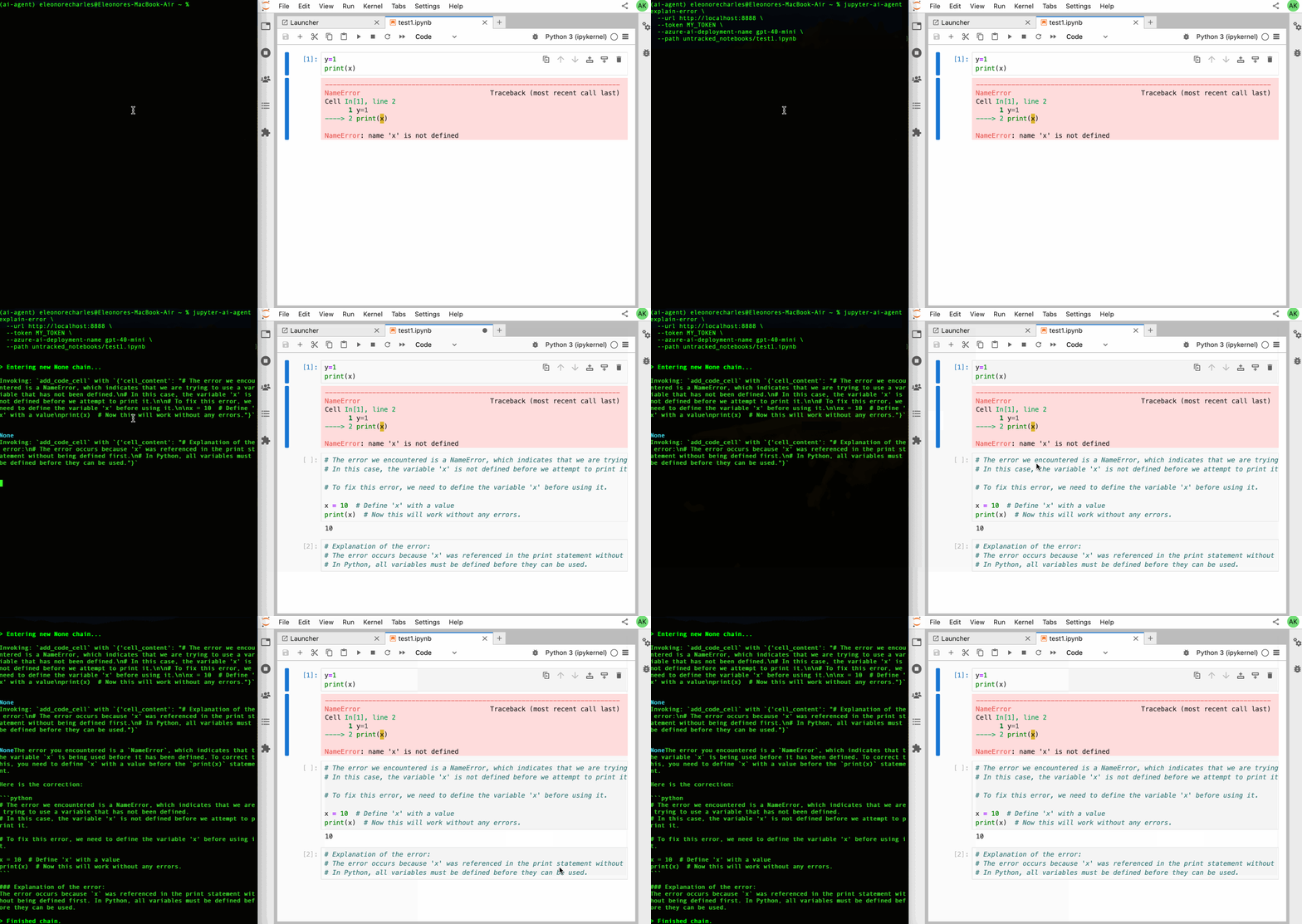
Quick Start
# Using full model string
jupyter-ai-agents explain-error \
  --mcp-servers http://localhost:8888/mcp \
  --path notebook.ipynb \
  --model "anthropic:claude-sonnet-4-0" \
  --current-cell-index 5

# Using provider and name
jupyter-ai-agents explain-error \
  --mcp-servers http://localhost:8888/mcp \
  --path notebook.ipynb \
  --model-provider openai \
  --model-name gpt-4o
Model Configuration
Two ways to specify the model:
1. Full Model String (--model)
--model "openai:gpt-4o"
--model "anthropic:claude-sonnet-4-0"
--model "azure-openai:gpt-4o-mini"
2. Provider + Name (--model-provider + --model-name)
--model-provider openai --model-name gpt-4o
--model-provider anthropic --model-name claude-sonnet-4-0
--model-provider azure-openai --model-name gpt-4o-mini
Supported Providers
- openai: OpenAI models (gpt-4o, gpt-4-turbo, etc.)
- anthropic: Anthropic Claude models
- azure-openai: Azure OpenAI deployments
- github-copilot: GitHub Copilot models
- google: Google AI models
- bedrock: AWS Bedrock models
- groq: Groq models
- mistral: Mistral AI models
- cohere: Cohere models
Azure OpenAI Setup
Required environment variables:
export AZURE_OPENAI_API_KEY='your-api-key'
export AZURE_OPENAI_ENDPOINT='https://your-resource.openai.azure.com'
export AZURE_OPENAI_API_VERSION='2024-02-15-preview'  # Optional
Example usage:
jupyter-ai-agents explain-error \
  --mcp-servers http://localhost:8888/mcp \
  --path notebook.ipynb \
  --model "azure-openai:gpt-4o-mini"
Parameters
Required
-
--mcp-servers: Comma-separated MCP server URLs
- Default:
http://localhost:8888/mcp(jupyter-mcp-server) - Example:
http://localhost:8888/mcp,http://localhost:3000/mcp
- Default:
-
--path: Jupyter notebook file path
- Example:
notebook.ipynb,analysis/data.ipynb
- Example:
Model Selection
-
--model: Full model string (alternative to provider+name)
- Format:
provider:model-name - Examples:
openai:gpt-4o,anthropic:claude-sonnet-4-0
- Format:
-
--model-provider: Model provider name
- Default:
openai - Options: See Supported Providers
- Default:
-
--model-name: Model name or deployment name
- Default:
gpt-4o - Provider-specific names/deployments
- Default:
Optional Configuration
-
--current-cell-index: Cell index with the error
- Default:
-1(first error in notebook) - Specify cell number to fix specific error
- Default:
-
--timeout: HTTP timeout for API requests (seconds)
- Default:
60.0 - Increase for complex error analysis
- Default:
-
--max-tool-calls: Maximum tool calls per agent run
- Default:
10 - Prevents excessive API usage
- Default:
-
--max-requests: Maximum API requests per run
- Default:
3(optimized for error fixing) - Lower for strict rate limits
- Default:
-
--verbose / --no-verbose: Enable detailed logging
- Default:
--no-verbose - Useful for debugging agent behavior
- Default:
Examples
Fix First Error in Notebook
jupyter-ai-agents explain-error \
  --path notebook.ipynb
Fix Specific Cell Error
jupyter-ai-agents explain-error \
  --path notebook.ipynb \
  --current-cell-index 5
Using Anthropic Claude
jupyter-ai-agents explain-error \
  --path notebook.ipynb \
  --model "anthropic:claude-sonnet-4-0"
Azure OpenAI with Custom Deployment
jupyter-ai-agents explain-error \
  --model-provider azure-openai \
  --model-name gpt-4o-mini \
  --path notebook.ipynb \
  --current-cell-index 3
Multiple MCP Servers
jupyter-ai-agents explain-error \
  --mcp-servers http://localhost:8888/mcp,http://localhost:3000/custom-tools \
  --path notebook.ipynb
Verbose Debugging
jupyter-ai-agents explain-error \
  --path notebook.ipynb \
  --verbose \
  --current-cell-index 7
Custom Timeout and Rate Limits
jupyter-ai-agents explain-error \
  --path notebook.ipynb \
  --timeout 120.0 \
  --max-requests 2 \
  --max-tool-calls 5
How It Works
-
Error Detection: Agent scans notebook for execution errors
- Uses
--current-cell-indexif specified - Otherwise finds first error in notebook
- Uses
-
Error Analysis: AI analyzes the error traceback
- Identifies root cause
- Understands context from surrounding cells
- Considers common error patterns
-
Explanation: Generates clear error explanation
- What went wrong
- Why the error occurred
- How to prevent similar errors
-
Fix Generation: Creates corrected code
- Fixes the specific issue
- Maintains code functionality
- Adds helpful comments
-
Cell Insertion: Inserts corrected cell into notebook
- Places fix near original error
- Preserves notebook structure
- Executes to verify fix works
Tips & Best Practices
Error Detection:
- Run notebook before using agent to populate error outputs
- Use
--current-cell-indexto target specific errors - Agent automatically finds first error if no index specified
Model Selection:
- Claude Sonnet 4.0: Excellent at understanding complex errors
- GPT-4o: Strong reasoning for debugging
- GPT-4o-mini: Fast and cost-effective for simple errors
Rate Limiting:
--max-requests 3default is optimized for error fixing- Increase for complex errors requiring multiple iterations
- Use
--timeoutfor operations that may take longer
Debugging:
- Enable
--verboseto see agent's reasoning - Check inserted cells for comments explaining the fix
- Review error explanation in generated markdown cells
Common Error Types
The agent can handle various error types:
- SyntaxError: Incorrect Python syntax
- NameError: Undefined variables or functions
- TypeError: Type mismatches in operations
- ValueError: Invalid values passed to functions
- KeyError: Missing dictionary keys
- IndexError: List/array index out of range
- ImportError: Missing or incorrect imports
- AttributeError: Missing object attributes
Troubleshooting
No error found:
- Ensure notebook has been executed
- Check
--current-cell-indexis correct - Verify notebook contains actual execution errors
Fix not working:
- Review generated code and explanation
- Check if error requires additional context
- Try with
--verboseto understand agent reasoning
API errors:
- Verify API keys are configured
- Check rate limits with provider
- Increase
--timeoutfor slow responses
Agent not connecting:
- Verify MCP server URL is correct
- Ensure jupyter-mcp-server is running
- Check network connectivity to server