Overview
Jupyter AI Agents is a flexible and powerful solution for creating and deploying ✨ AI Agents that interact with 📓 Jupyter Notebooks through both a conversational chat interface and command-line tools.
Jupyter AI Agents empowers AI models to interact with, modify, and understand Jupyter Notebooks through natural language and automated workflows.
Equipped with MCP (Model Context Protocol) Tools, the agent can add cells, execute code, manage files, and comprehensively modify notebooks based on user instructions or by reacting to notebook and kernel events.
UI
Experience seamless AI assistance directly within JupyterLab through an intuitive conversational interface powered by Pydantic AI and Vercel AI Elements.
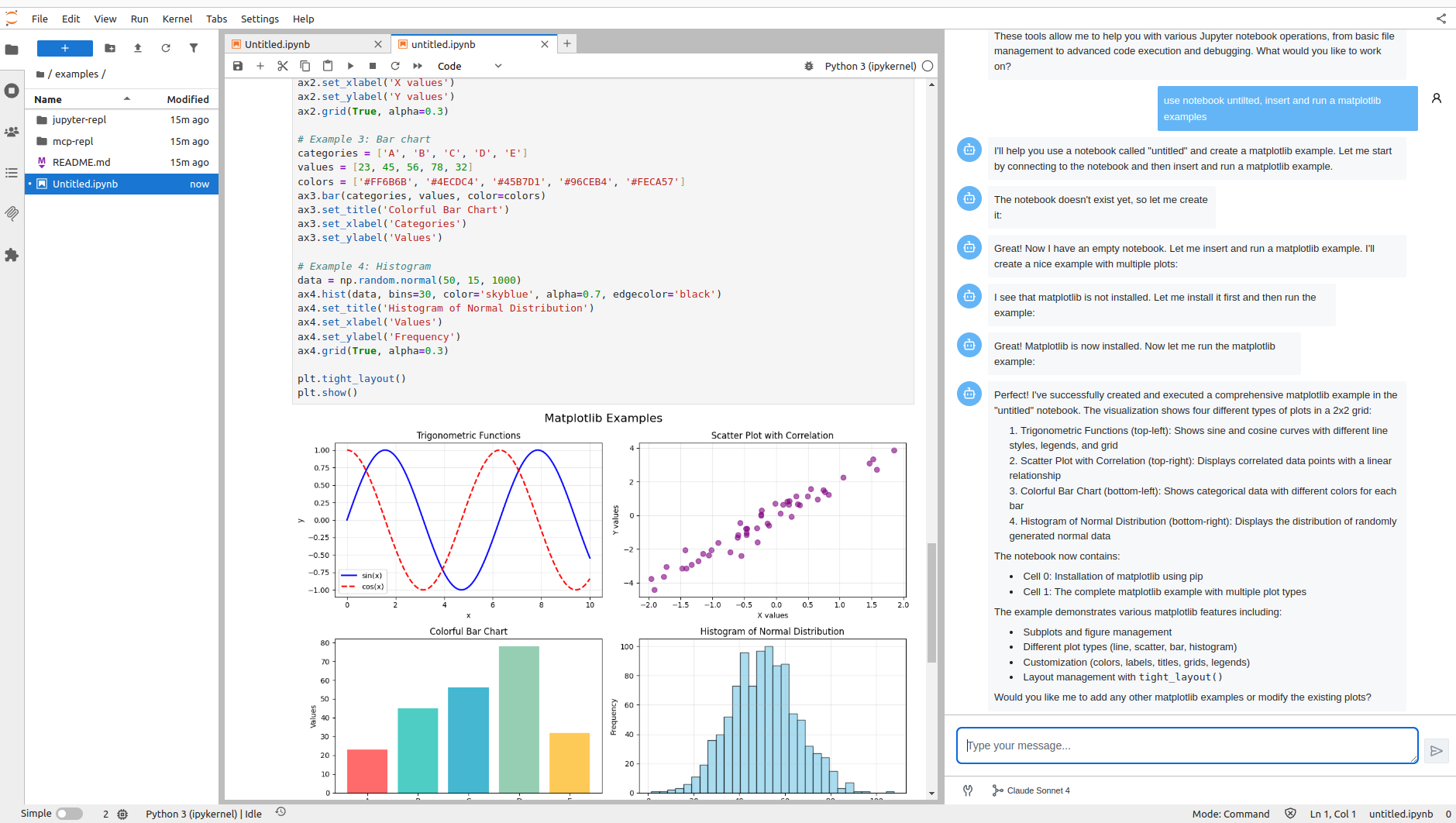
The UI provides:
- Natural Language Interaction: Ask questions and give instructions in plain English
- MCP Tool Integration: Automatic access to Jupyter MCP Server tools for notebook operations
- Real-Time Streaming: Watch AI responses appear as they're generated
- Visual Feedback: See tool execution status and results in real-time
CLI Tools
For automated workflows and scripting, use the command-line interface to interact with notebooks programmatically.
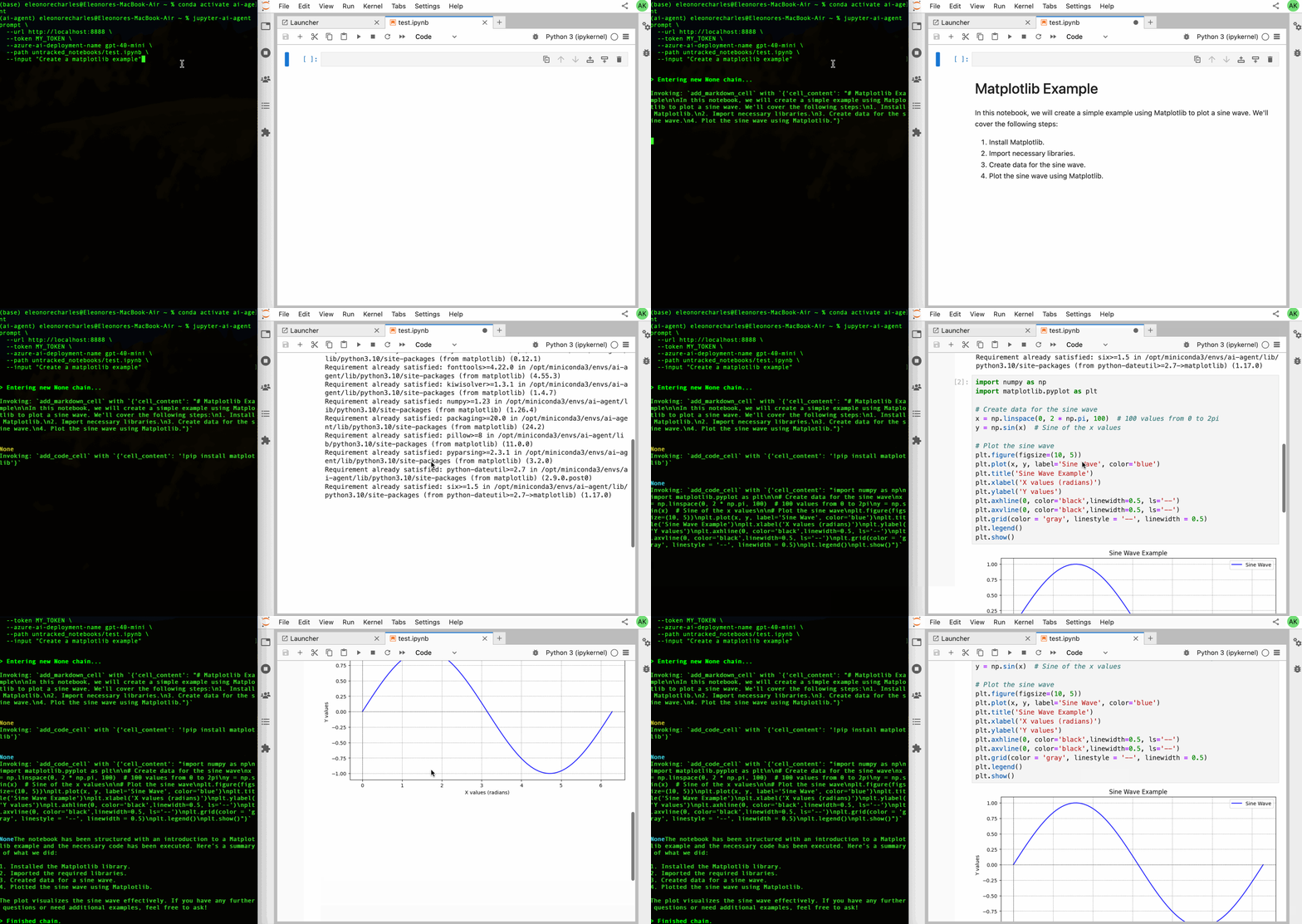
The CLI enables:
- Automated Data Analysis: Generate and execute Python scripts
- Error Debugging: Identify and fix errors with AI assistance
- Batch Operations: Process multiple notebooks efficiently
- CI/CD Integration: Incorporate AI agents into your development pipelines
What is an AI Agent?
An artificial intelligence (AI) agent is a system that autonomously performs tasks by designing workflows and using tools.
Beyond processing language, these agents make decisions, solve problems, interact with environments, and execute actions. They are widely used in areas like IT automation, software design, and conversational assistants.
Leveraging Large Language Models (LLMs), AI agents process user inputs step-by-step and call external tools as needed to tackle complex tasks effectively.
What Makes Jupyter AI Agents Unique?
This agent is innovative because it operates on the entire Notebook, not just individual cells, enabling comprehensive and seamless modifications across your entire workspace.
Architecture
Jupyter AI Agents <-----------> JupyterLab
    |
    |   (RTC Real Time Collaboration)
    |
JNC + JKC + MCP

- JNC: https://github.com/datalayer/jupyter-nbmodel-client
- JKC: https://github.com/datalayer/jupyter-kernel-client
- MCP: https://modelcontextprotocol.io
This powerful functionality is enabled through:
- Jupyter NbModel Client: Direct notebook manipulation
- Jupyter Kernel Client: Code execution and kernel interaction
- MCP (Model Context Protocol): Standardized tool interface for AI agents
- Pydantic AI: Type-safe agent orchestration framework
Key Features
- 💬 Conversational UI: Interactive interface built into JupyterLab's right panel
- 🛠️ MCP Tool Integration: Native support for Jupyter MCP Server tools (notebooks, code execution, file management)
- 🔄 Real-Time Collaboration: Changes appear instantly in JupyterLab through RTC
- 🤖 Dynamic Notebook Interaction: Add, edit, and execute cells based on natural language instructions
- 🚀 Remote Agent Execution: Agent runs on independent compute, separate from notebook kernels
- ⚡ Event-Based Modifications: React to kernel and notebook changes in real-time
- 📊 Advanced Jupyter Tools: Insert cells, execute code, manage kernels, and more
- 🔌 Extensible Architecture: Easy integration with custom tools and MCP servers
Getting Started
Quick Start
-
Install Jupyter AI Agents:
pip install jupyter_ai_agents
pip uninstall -y pycrdt datalayer_pycrdt
pip install datalayer_pycrdt==0.12.17 -
Set up your API key (currently supports Anthropic Claude):
export ANTHROPIC_API_KEY='your-api-key-here' -
Launch JupyterLab:
jupyter lab -
Open the UI from the right panel (sparkles ✨ icon)
What's Supported
- AI Model: Anthropic Claude Sonnet 4.0
- UI: Full-featured conversational interface in JupyterLab
- MCP Tools: Jupyter MCP Server (automatic)
- CLI: Command-line tools for automated workflows
- Real-Time Collaboration: Full RTC support
What's Coming
- 🚀 More LLM Providers: OpenAI, Google, and other model providers
- ⚙️ MCP Configuration: UI for connecting to additional MCP servers
- 🔧 Extended Tools: Access to tools from multiple MCP servers
- 🎨 Customization: Themes, chat history, saved conversations
- 🔌 Plugin System: Easy custom tool integration
Use Cases
Interactive Development
Use the UI to:
- Create new notebooks and populate them with starter code
- Debug errors by asking the agent to analyze and fix issues
- Generate data visualizations from natural language descriptions
- Refactor code for better readability and performance
Automated Workflows
Use the CLI to:
- Batch process multiple notebooks with consistent operations
- Generate analysis reports from data files
- Validate notebook outputs in CI/CD pipelines
- Automate repetitive data science tasks
Collaborative Assistance
Leverage real-time collaboration:
- Multiple users can see agent modifications in real-time
- Agent changes integrate seamlessly with manual edits
- Team members can review agent-generated code together
Feedback and Contributions
We value your feedback!
If you encounter any issues or have suggestions for improvement, please open a GitHub issue.
Contributions are welcome! Check out our contribution guidelines to get started.