UI
Conversational AI interface built into JupyterLab for seamless notebook interaction.
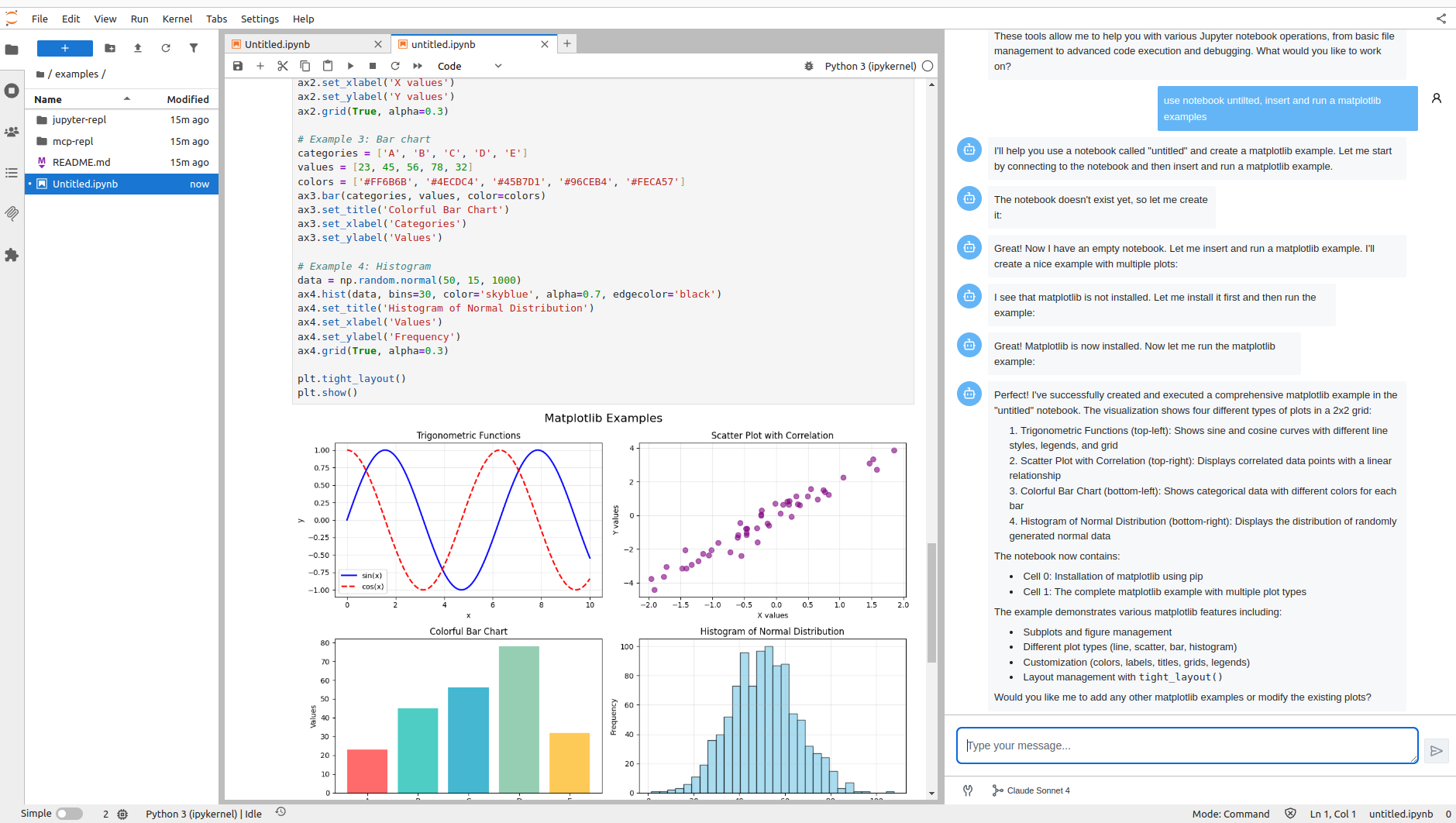
Overview
- Location: Right sidebar panel in JupyterLab (sparkles ✨ icon)
- Interaction: Natural language conversational interface
- Real-time: Streaming AI responses and instant notebook updates
Technology Stack:
- Pydantic AI: Type-safe agent orchestration
- Vercel AI Elements: React UI components
- Agent Runtimes: Multi-protocol agent platform
Features
🛠️ MCP Tool Integration
Automatic access to Jupyter MCP Server tools:
- Notebook Operations: Create, read, update notebooks and cells
- Code Execution: Run Python code, retrieve results
- File Management: List, read, write workspace files
- Kernel Management: Start, stop, interact with kernels

💬 Conversational Interface
- Natural language queries (ask about code, data, notebooks)
- Streaming responses (real-time AI generation)
- Context awareness (understands workspace and open notebooks)
- Tool execution feedback (visual status updates)
- Markdown rendering (code highlighting, formatting)
🔄 Real-Time Collaboration
Jupyter RTC integration:
- Agent modifications appear instantly in JupyterLab
- Watch cells being added/executed in real-time
- Seamless integration with manual edits
- Multi-user collaboration support
Getting Started
Current Support: Anthropic Claude Sonnet 4.0
Quick Setup:
# 1. Install
pip install jupyter_ai_agents
pip uninstall -y pycrdt datalayer_pycrdt
pip install datalayer_pycrdt==0.12.17

# 2. Configure API key
export ANTHROPIC_API_KEY='your-api-key-here'

# 3. Launch JupyterLab
jupyter lab

# 4. Open UI from right panel (sparkles ✨ icon)
Usage
Type natural language instructions in the UI:
Example Prompts
Notebook Creation:
- "Create a new notebook called 'data-analysis.ipynb' with pandas and numpy imports"
- "Start a notebook for analyzing the sales dataset"
Code Execution:
- "Execute the current cell and explain the output"
- "Run all cells in this notebook"
Debugging:
- "This code is throwing a KeyError. Can you fix it?"
- "Why is cell 3 failing?"
Data Analysis:
- "Create a bar chart showing revenue by product category"
- "Generate summary statistics for this dataset"
Refactoring:
- "Refactor cell 3 to use functions instead of inline code"
- "Add docstrings to all functions in this notebook"
Agent Workflow
- Understand your natural language request
- Select appropriate tools (create notebook, execute code, etc.)
- Execute operations using MCP tools
- Stream responses and show tool status
- Update notebook in real-time via RTC
Visual Feedback
- Tool names and parameters displayed
- Execution status (⏳ pending, ✅ success, ❌ error)
- Tool results and output
- Real-time notebook updates
Architecture
Frontend (TypeScript/React)
- ChatWidget: JupyterLab widget container
- Chat Component:
@datalayer/agent-runtimesReact UI - Agent Store: Zustand state management
- Query Client: React Query for API calls
Backend (Python)
- AgentRuntimesApp: FastAPI server
- Vercel AI Transport: Streaming protocol adapter
- Pydantic AI Agent: Core logic and tools
- MCP Server: Jupyter operations provider
Communication Flow
User → UI → Vercel AI → Agent Server
                              ↓
                        Pydantic AI
                              ↓
                   MCP Tools → Jupyter
                              ↓
        UI ← Streaming ← Response
Configuration
Agent Configuration (Jupyter server extension):
- Model: Claude Sonnet 4.0 (more providers coming)
- System prompts (future)
- Tool availability (future)
- Model parameters (future)
MCP Server: Starts automatically with defaults
- Additional MCP servers: Coming soon
- Visual configuration UI: In development
Technical Details
Transport: Vercel AI (vercel-ai-jupyter)
- Streaming responses
- Tool execution handling
- Type-safe communication
- React integration
Initialization Sequence:
- Check agent availability on Jupyter server
- Register agent in unified store
- Establish Vercel AI transport connection
- Fetch tools and configuration
- Enable chat input
State Management (Zustand):
- Persistent connections across UI updates
- Status tracking (initializing, running, stopped, error)
- Shared state across components
- Optimized re-renders
Troubleshooting
Agent Not Available:
- ✓ Jupyter server running?
- ✓
jupyter_ai_agentsinstalled? - ✓
ANTHROPIC_API_KEYset? - ✓ Check Jupyter server logs
Tool Execution Failures:
- ✓ Notebooks saved before operations?
- ✓ MCP Server running? (auto-starts)
- ✓ File/notebook permissions correct?
- ✓ Check agent error messages
Connection Issues:
- ✓ Refresh JupyterLab page
- ✓ Check browser console
- ✓ Network connectivity to server
- ✓ Firewall blocking WebSockets?
Roadmap
- 🚀 More LLM Providers: OpenAI, Google, Anthropic models
- ⚙️ MCP Configuration UI: Visual MCP server management
- 🔧 Extended Tools: More MCP server integrations
- 🎨 Customization: Themes, history, saved conversations
- 🔌 Plugin System: Custom tools and agents
- 📊 Analytics: Usage insights and performance tracking
Contribute: GitHub Issues